
You probably know that it is easy to embed Youtube videos on your website. Youtube provides an embed code for each and every one of its videos, and all you need to do is to copy/paste the code to your site. Now, what if you just want to embed only the audio part of the video? There’s actually a workaround that allows you to embed only the audio part of a YouTube video. Follow along to learn how.
Embedding the Audio Part of a YouTube Video on Your Website
1. Head over to YouTube and find the video (or audio) that you want to add to your website.
2. Once you are on the video page, note down the ID of the video you want to embed.
For example, if the video URL is https://www.youtube.com/watch?v=Obx3e7MfEaI, then the video ID is: Obx3e7MfEaI
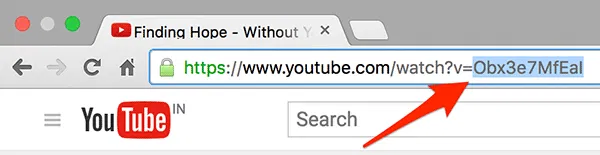
3. In the following code, replace “VIDEO-ID” with the ID of the YouTube video that you noted down in the previous step.
4. So, for the video URL I have given above, the code will look like the following:
5. Place the code in your website's file and load the page. You will see that it does not load the video player anymore. Instead, it only loads the music control for you to control the audio part of the actual video.
6. There are a few things that you can tweak in the code if you wish:
- data-autoplay – if you set this to “1”, the audio will start playing as soon as the page loads.
- data-loop – if you set this to “1”, the audio will play in a loop (just like how you play a YouTube video in a loop).
This should come in handy for you if you happen to embed only music tracks on your website and most of those are available on YouTube.
Conclusion
While YouTube doesn’t give you the embed code to embed the audio part of a video, you can make one yourself with the YouTube API using the above method.
// ]]>
- data-loop – if you set this to “1”, the audio will play in a loop (just like how you play a YouTube video in a loop).